Guides · · By the usi3d team
3D printing glossary: 78 terms explained plainly
This glossary explains the 78 terms that come up most in 3D printing, from FDM and resin to slicer, infill, overhang, warping, PEI, hotend and Klipper. Each entry says what the thing is, what it does and, where it helps, the values you would use on a desktop printer with a 0.4 mm nozzle.
Key points
- FDM melts filament layer by layer; resin printing hardens liquid with ultraviolet light.
- The slicer turns the model (STL or 3MF) into G-code, the instructions the printer follows.
- Layer height, walls and infill decide almost everything: print time, strength and grams.
- Overhangs beyond about 45° need supports; short bridges do not.
- Warping, stringing and elephant's foot are the three named faults you are likely to meet first.
3D printing has its own vocabulary, much of it borrowed from slicer menus. Here it is grouped by topic: the machines, their parts, the files, the settings, the materials and the faults. If you are just starting, read it alongside our guide to your first 3D print.
What types of 3D printer are there
- FDM (or FFF): fused deposition modelling. A 1.75 mm plastic filament is fed into a hot nozzle and laid down in lines, layer by layer. It is the most common home printer.
- Resin (SLA, MSLA, DLP): a platform dips into liquid resin and ultraviolet light hardens each layer. In MSLA the light shines through an LCD screen that acts as a mask. It gives finer detail than FDM, but calls for gloves, goggles, ventilation and washing.
- SLS: selective laser sintering of powder, usually nylon. It is an industrial process and needs no supports, because the powder itself holds the part.
- Bed slinger: a Cartesian printer whose bed moves back and forth (the Y axis) while the head moves sideways and up.
- CoreXY: two motors move the head in X and Y together through a belt layout, and the bed only moves down. It allows higher speeds and is common on enclosed printers.
- Build volume: the largest part that fits, for example 256 × 256 × 256 mm. If your model does not fit, you can split it into parts with joints.
- Enclosure: the box around the printer. It keeps heat in for ABS, ASA or nylon; with PLA you should open it so the filament does not soften in the nozzle.
- Multi-material: a system that swaps filament during a print to print in several colours, such as Bambu Lab's AMS or Prusa's MMU.
The parts of an FDM printer
- Extruder: the gears that grip the filament and push it to the nozzle. If it clicks or skips, something is blocking the plastic.
- Direct drive and Bowden: on a direct drive the motor sits on the print head; on a Bowden it sits on the frame and the filament travels through a PTFE tube. Direct drive handles TPU better; Bowden keeps the head light.
- Hotend: the hot part: heater block, heater cartridge, thermistor, heat break and nozzle. It melts the filament at the temperature you set.
- Nozzle: the tip the plastic comes out of. The standard is brass, 0.4 mm; hardened steel nozzles cope with fibre-filled filaments.
- Heat break: the thin tube separating the hot zone from the heatsink. If heat creeps up it, the filament softens too early and jams (heat creep).
- Thermistor: the sensor that measures hotend or bed temperature. A loose thermistor causes errors such as MINTEMP or thermal runaway.
- Heated bed: the heated base you print on. PLA likes about 55-65 °C; PETG 70-85 °C; ABS and ASA 90-110 °C.
- PEI sheet: the most common print surface, a polyetherimide film on flexible spring steel. Smooth PEI gives glossy faces; textured PEI gives a grainy finish and parts that pop off once cool.
- Bed levelling probe: measures the gap between nozzle and bed at several points. There are touch probes (BLTouch, CR Touch), inductive probes and load-cell or strain-gauge sensors in the head itself.
- Bed mesh: the height map that probe produces. The firmware compensates by moving Z while it prints the first layer.
- Z offset: the amount added to or taken from the nozzle height after levelling. A few hundredths of a millimetre decide whether the first layer sticks.
- Part cooling fan: the fan that blows on freshly laid plastic. Full speed for PLA; low or off for ABS and ASA.
- Belts and pulleys: carry the motors' movement to the X and Y axes. A slack belt leaves ripples and shifted layers.
- Lead screw: the threaded rod that raises and lowers the Z axis. If it is dirty or bent, bands appear that repeat up the height of the print.
- Filament sensor: detects when the filament runs out or snaps and pauses the print.
3D files and slicing
- Mesh: the surface of a 3D model described with triangles. A detailed figurine can have hundreds of thousands.
- STL: the most common printing format. It stores only triangles, with no colour or units: software assumes millimetres.
- 3MF: the format modern slicers use. It stores the part with its units, colours, several objects on one plate and the print settings.
- OBJ and GLB: modelling and web formats. OBJ stores geometry and, separately, materials; GLB packs everything into one file, colours and textures included. You can convert between STL, OBJ and GLB in your browser.
- Manifold (watertight): a closed mesh with no holes or loose faces, enclosing a volume. The slicer needs it to tell inside from outside.
- Normals: the direction each triangle faces. If a face points inwards, the slicer may leave gaps. Repair model finds open edges and badly oriented faces.
- Slicer: the program that cuts the model into layers and works out the toolpaths. The most widely used are Bambu Studio, OrcaSlicer, PrusaSlicer and Cura.
- G-code: the file of instructions the slicer produces: move here, extrude this much, heat to this temperature. Each printer expects its own, so another machine's file will not do.
- Profile: a saved set of settings for a printer, a material or a quality, such as “0.20mm Standard”. Starting from the manufacturer's profiles saves a lot of test prints.
- Plate: in the slicer, the virtual bed where you arrange the parts that will print together.
Print settings you will see in your slicer
- Layer height: the thickness of each layer. With a 0.4 mm nozzle, 0.08 to 0.28 mm; 0.2 mm is the middle ground between detail and time.
- Line width: the width of each extruded line, usually a little wider than the nozzle: 0.42-0.45 mm on a 0.4.
- Walls (perimeters): the lines forming the outline of each layer. Two are enough for decorative parts; three or four add strength.
- Top and bottom layers: the solid layers that close the part above and below. Too few and the infill shows through the top.
- Infill: the internal structure, as a percentage. 10-15% is enough for figurines; gyroid and grid are the most common patterns. It weighs heavily on cost, as we explain in how much 3D printing costs.
- Overhang: any part that sticks out with nothing underneath. Up to about 45° from vertical it prints well; beyond that, it needs supports.
- Bridge: a line strung through the air between two supports. With good cooling, a 20-30 mm bridge prints without supports.
- Supports: structures that hold up overhangs and are removed afterwards. Tree supports touch the part less and usually use less material on figurines.
- Brim, skirt and raft: a brim widens the first layer around the part so it grips better; a skirt is a separate line that primes the nozzle; a raft is a full base under the part.
- Retraction: pulling the filament back before a travel move so it does not ooze. On direct drive, 0.5 to 1 mm; on Bowden, 4 to 6 mm.
- Seam: the point where each perimeter starts and ends. You can align it on an edge or hide it in a corner.
- Flow: the multiplier for how much plastic comes out. Calibrating it fixes walls that are too thick or full of gaps.
- Pressure advance (linear advance): compensates for nozzle pressure when the head speeds up and slows down, so corners do not bulge.
- Input shaping: the firmware measures the machine's vibrations and cancels them, so you can print fast without ripples on the walls.
- Vase mode: prints a single wall in one continuous spiral, with no infill or top. Ideal for vases and lampshades.
- Prime tower (purge tower): the tower printed beside the part to clean the nozzle at every colour change.
- Ironing: the nozzle passes over the top layer again, barely extruding, to leave it smooth.
- Calibration: test prints to tune the machine: a 20 mm cube, a temperature tower, a retraction or flow test.
Materials: the most common filaments
| Material | Nozzle | Bed | Good for |
|---|---|---|---|
| PLA | 190-220 °C | 55-65 °C | Figurines, prototypes and most indoor parts |
| PETG | 230-250 °C | 70-85 °C | Parts that flex a little or live outdoors |
| ABS and ASA | 240-260 °C | 90-110 °C | Heat and sun; need an enclosure |
| TPU | 210-230 °C | 40-60 °C | Flexible parts: cases, seals, wheels |
| Nylon (PA) | 250-280 °C | 70-90 °C | Tough mechanical parts that resist wear |
- PLA: easy to print with little smell. It softens at around 60 °C, so it will not survive a car interior in summer.
- PETG: tougher and more heat-resistant than PLA. It tends to string and can bond too well to smooth PEI.
- ABS and ASA: withstand heat; ASA also withstands sunlight. They shrink as they cool and give off fumes: print them enclosed, in a ventilated room.
- TPU: flexible filament. Its Shore hardness tells you how flexible: 95A is the most common and prints slowly, best with direct drive.
- Nylon (PA): very strong, but it soaks up moisture from the air within hours and must be dried before printing.
- Fibre-filled filaments (CF, GF): contain chopped carbon or glass fibre. They are stiff and wear out a brass nozzle in a few hours: use hardened steel.
- Hygroscopic: absorbs moisture. Wet filament crackles, bubbles and strings; a few hours in a filament dryer sorts it out.
Print faults with their own names
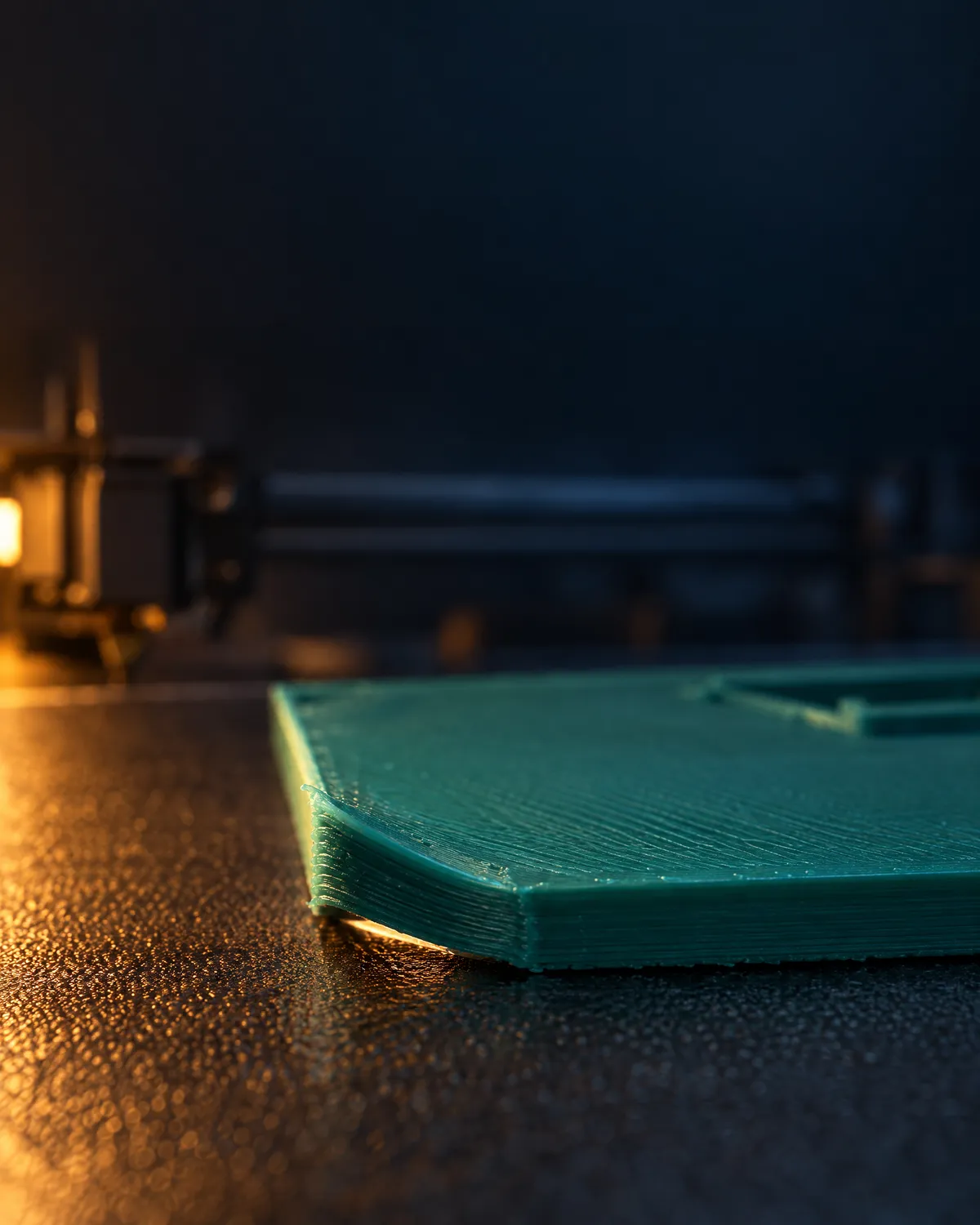
- Warping: corners lift and the base curls because the plastic shrinks as it cools. Very common with ABS and ASA without an enclosure.
- Elephant's foot: the first layers come out wider than the rest, because the nozzle is too low or the bed too hot.
- Stringing: cobwebs between parts of the print. Usually wet filament, too much heat or too little retraction.
- Under-extrusion and over-extrusion: less or more plastic than needed. The first leaves gaps and thin walls; the second, blobs and oversized dimensions.
- Layer shift: the print suddenly jumps in X or Y at a certain height. Slack belts, a nozzle strike or motors skipping steps.
- Delamination: layers split apart or the part cracks between layers, usually from low temperature or too much fan.
- Ghosting (ringing): ripples or echoes on the wall after a corner or a feature, caused by machine vibration.
- Clog and heat creep: the nozzle stops extruding. It can be debris, a burnt fragment or heat creeping up the heat break.
- Cold pull: a way to clean the nozzle: heat it, let it cool slightly and pull the filament out to bring the debris with it.
- Spaghetti: the part comes loose and the printer keeps extruding into the air, leaving a tangle of filament.
If your printer is doing any of this, describe it, with a photo, to usi3d's AI in Fix 3D printer problems: it tells you what to check first and how to fix it, with the manufacturer's official sources. We walk through it in how to fix your 3D printer's problems with AI.
Firmware and control software
- Firmware: the printer's internal program, which reads the G-code and drives motors and heaters. The most widespread are Marlin, Klipper and each manufacturer's own.
- Marlin: open-source firmware that runs entirely on the printer's board. Many Creality and Anycubic printers, and older Prusa machines, run it or a fork of it.
- Klipper: firmware that splits the work: the board only drives the motors while a small computer, such as a Raspberry Pi, does the maths. It makes input shaping and pressure advance easy and is run from the browser with Mainsail or Fluidd.
- OctoPrint: software to control and monitor a Marlin printer over the network, with a camera and plug-ins.
- Thermal runaway protection: the safeguard that shuts the printer down if a temperature fails to rise or climbs abnormally. Never disable it.
Resin printing terms
- Vat: the resin tank, with a transparent bottom the light shines through.
- FEP: the non-stick film at the bottom of the vat. If it is scratched or punctured, replace it.
- Exposure time: the seconds the light cures each layer. Too little and the print detaches or loses detail; too much and it bloats.
- Washing and curing: after printing, the part is washed in isopropyl alcohol or the cleaner the manufacturer specifies, then cured under ultraviolet light. Wear nitrile gloves and goggles throughout.
- Suction cup effect: a hollow, closed part creates a vacuum against the FEP and gets torn off. Drainage holes prevent it.
Frequently asked questions
What does FDM mean in 3D printing?
Fused deposition modelling: the printer melts a plastic filament and lays it down in layers. FFF (fused filament fabrication) is the same process under another name.
What is a slicer in 3D printing?
The program that cuts a 3D model into layers and generates the G-code the printer follows. Bambu Studio, OrcaSlicer, PrusaSlicer and Cura are the most widely used.
What is Z offset?
The correction to the nozzle's height above the bed after levelling. A few hundredths of a millimetre too high and the first layer will not stick; too low and the nozzle scrapes the bed.
What is warping?
Distortion that happens when plastic shrinks as it cools and lifts the corners off the bed. A clean bed, a brim and, for ABS or ASA, an enclosed printer all reduce it.
What is the difference between STL and 3MF?
STL stores only the shape as triangles, with no units or colour. 3MF also stores units, colours, several objects and print settings, which is why modern slicers prefer it.
What is Klipper?
Open-source firmware that splits the work between the printer's board and a small computer such as a Raspberry Pi. It enables fast printing with input shaping and is controlled from a web browser.